Stress Testing Excel Copilot: Merging Two 700K-Row Excel Files
Can Excel Copilot merge two 700K-row Excel files?
Merging two customer lists is one of the most common jobs in Excel, and one of the easiest to get wrong at scale. I wanted to see how Copilot in Excel handles a version that's realistic but hard: two CRM exports of 752,318 and 721,904 contacts, where some emails don't match exactly. Combined, they should produce one list of 755,435 rows.
I picked this case on purpose. Excel can do this merge, but it's a bit trickier than usual. The two lists are too big to stack in one sheet and run Remove Duplicates, so it takes helper columns, lookups, or Power Query instead. For most people the obstacle is the know-how, not the software. That's exactly where an AI assistant should help, so the question was whether Copilot could get it done for someone who doesn't know those tools.
I gave Copilot the same request 15 times, each in a fresh chat, and recorded every run. The short answer: it produced the correct list 4 times.
This post covers the setup, the method, every run's outcome, and alternative methods to get this done.
At a glance
I asked Microsoft 365 Copilot in Excel to merge two CRM exports totaling 1.47 million rows, 15 times. It returned the correct 755,435-contact list in only 4 runs, taking 1:49 to 9:07. Four runs ended with Excel unresponsive or locked after lengthy processing times; in three, Copilot kept showing it was working, with no visible progress, until I stopped it; two returned the wrong count; one gave up; and Copilot stopped one and asked me to redo the request.
How you'd merge them in Excel without Copilot
Doing this merge by hand in Excel is a multi-step job. The two exports total 1,474,222 rows, so you can't paste them into one sheet and click Remove Duplicates; that's 425,646 rows over Excel's 1,048,576-row limit. Instead you'd add a helper column to each sheet that cleans the email with TRIM and LOWER, then use XLOOKUP to match old-CRM contacts against the new CRM. A second lookup in the other direction finds the 3,117 new-only contacts to append to the old-CRM sheet, for a final list of 755,435 contacts. At 700,000+ rows per sheet, those lookups are slow to recalculate.
The more reliable manual route is Power Query: load both sheets as queries, add a cleaned-email column to each, run a full outer merge on that column, expand the fields, and load the 755,435-row result to a new sheet. It works, but it takes a series of steps and some Power Query know-how. That's the work Copilot is supposed to take off your plate.
The test
The job was to combine two CRM exports into one deduplicated contact list.
- Old CRM: 752,318 rows, 7 columns
- New CRM: 721,904 rows, 7 columns
- Both delivered as sheets in one .xlsx workbook: 1,474,222 rows combined, more than Excel's 1,048,576-row sheet limit
The hard part is matching emails. 718,787 contacts appear in both exports, but 28,946 of those emails differ only by capitalization or extra spaces (common differences that happen when exporting from two different systems). An exact match misses them, so a merge that skips the cleanup returns the wrong count.
| Group | Contacts |
|---|---|
| In both exports | 718,787 |
| Only in the old CRM | 33,531 |
| Only in the new CRM | 3,117 |
| Correct merged list | 755,435 |
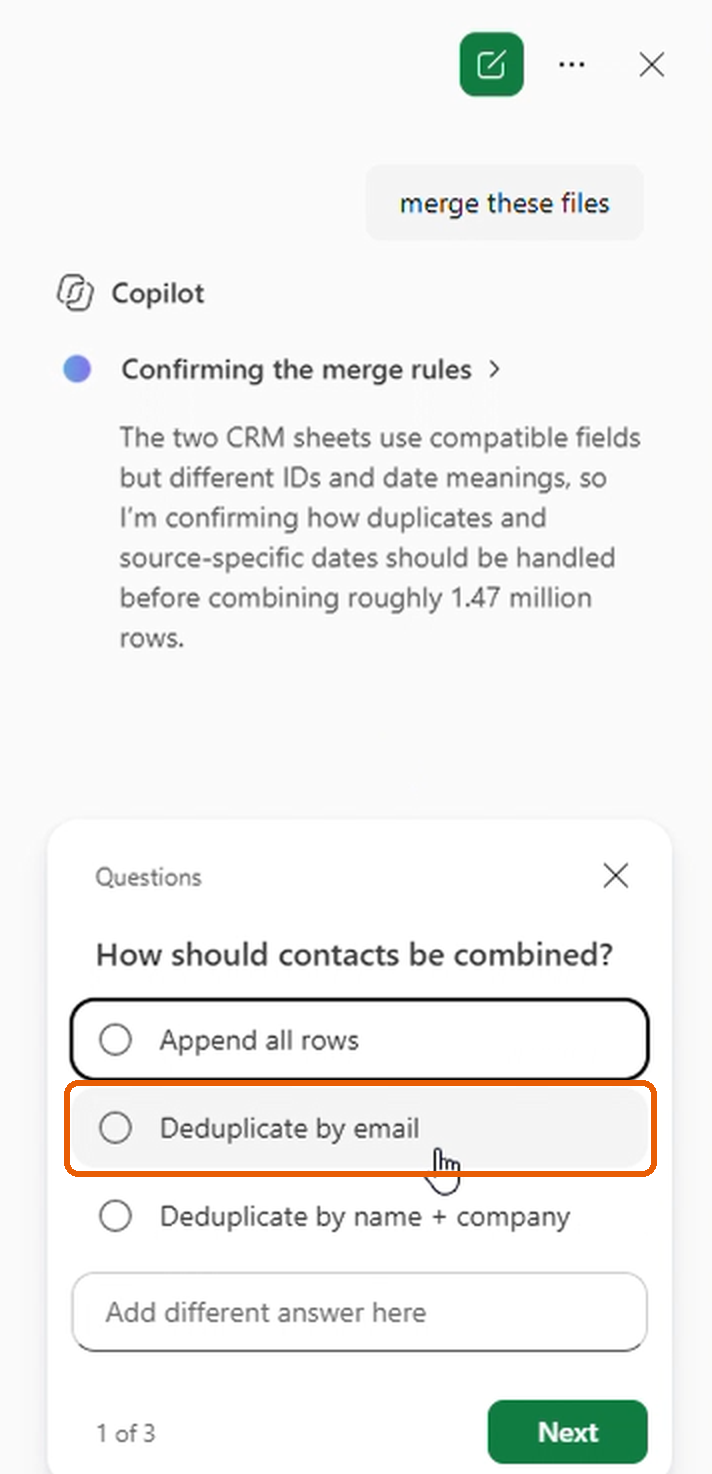
Copilot recognized the cleanup step. In every run it offered email cleanup and deduplication as an option, and I selected it.
Method
Every run used the same workbook, the same prompt, and no instructions on how to merge.
- Prompt: "merge these sheets"
- A fresh Copilot chat on a restarted machine before each run
- Copilot's clarifying questions answered each time; always went with the dedupe option
- Every run screen-recorded and timed; step counts are the "Reasoned in N steps" line Copilot shows when it finishes
- Tested September 29, 2026
- Dell XPS 13 7390 (Intel Core i7-10510U, 8 GB RAM), Windows 11 Home
- Excel for Microsoft 365 (consumer subscription), Version 2609, Build 16.0.20430.20032, 64-bit
Results
Four of 15 runs reached the correct 755,435-contact list. By outcome:
Excel Copilot merge run times, 15 runs (minutes)
Horizontal bar chart of 15 Excel Copilot merge runs, time in minutes from 0 to 26. 4 correct runs (2, 6, 10, 12) took 1:49 to 9:07. 4 runs ended with Excel unresponsive or locked (1, 3, 4, 9) between 10:43 and 19:58. In 3 runs (8 at about 21 minutes, 13 at 25+ minutes, 15 at 15:57) Copilot kept showing it was working with no visible progress until I stopped it. 2 runs returned the wrong count (5 at 14:13, 11 at 7:59). Run 7 gave up at 7:44, and Copilot stopped run 14 at 5:34. A dashed band from 1:02 to 1:19 marks TenMil's 15 runs, all correct.
- Correct (4)
- Excel unresponsive or locked (4)
- Stalled, stopped by me (3)
- Wrong count (2)
- Gave up or stopped by Copilot (2)
- TenMil (15 of 15 correct)
Minutes
- Correct (4 runs): runs 2, 6, 10, 12, in 1:49 to 9:07
- Excel unresponsive or locked (4): runs 1, 3, 4, 9, ending between 10:43 and 19:58
- Stalled, stopped by me (3): runs 8, 13, 15, where Copilot kept showing it was working, with no visible progress for several minutes; I stopped them at about 21 minutes, 25+ minutes, and 15:57
- Finished with the wrong count (2): run 5 dropped the 33,531 old-CRM-only contacts; run 11 skipped deduplication
- Gave up (1): run 7, at 7:44
- Stopped by Copilot (1): run 14, at 5:34, with a request to redo it
| Run | Outcome | Time | What happened |
|---|---|---|---|
| 1 | Excel unresponsive | 15:32 | Copilot reasoned in 14 steps, then said the merge could not be completed because Excel became unresponsive |
| 2 | Correct | 5:03 | 755,435 contacts after Copilot switched methods on its own mid-run, reasoned in 24 steps |
| 3 | Excel locked | 10:43 | Copilot reported that Excel became locked |
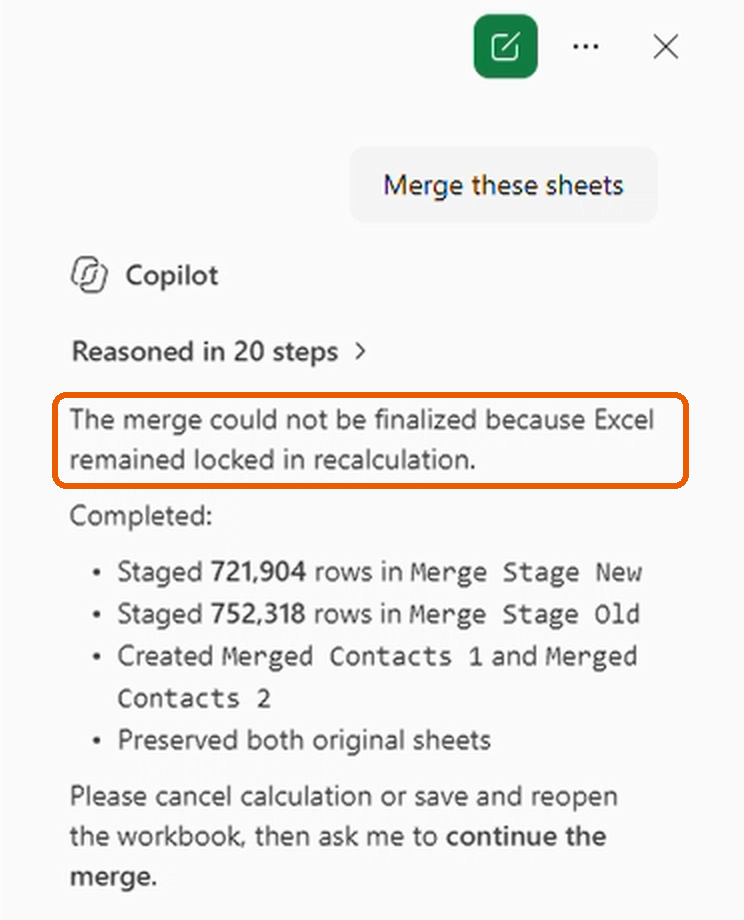
| 4 | Excel locked | 19:58 | Copilot said the merge could not be finalized because Excel was locked in recalculation |
| 5 | Wrong count | 14:13 | 721,904 contacts; the 33,531 old-CRM-only contacts were missing |
| 6 | Correct | 9:07 | 755,435 contacts after recovering from a response timeout and a transfer-limit error, reasoned in 24 steps |
| 7 | Gave up | 7:44 | "I am not able to answer that" |
| 8 | Stalled, stopped by me | About 21 min | Copilot looped on "letting the workbook clear its queue" from 11:20 with no visible progress, so I stopped it |
| 9 | Excel unresponsive | 15:36 | Copilot said it could not safely complete the merge during the 1.47M-row operation |
| 10 | Correct | 1:49 | 755,435 contacts, reasoned in 5 steps |
| 11 | Wrong count | 7:59 | All 1,474,222 rows, no deduplication |
| 12 | Correct | 4:28 | 755,435 contacts, reasoned in 15 steps |
| 13 | Stalled, stopped by me | 25+ min | Copilot kept showing it was working, with no visible progress, so I stopped it |
| 14 | Stopped by Copilot | 5:34 | Copilot stopped the run and asked me to redo the request; no merged list |
| 15 | Stalled, stopped by me | 15:57 | Copilot showed "letting the workbook recalculate" for several minutes with no visible progress, so I stopped it |
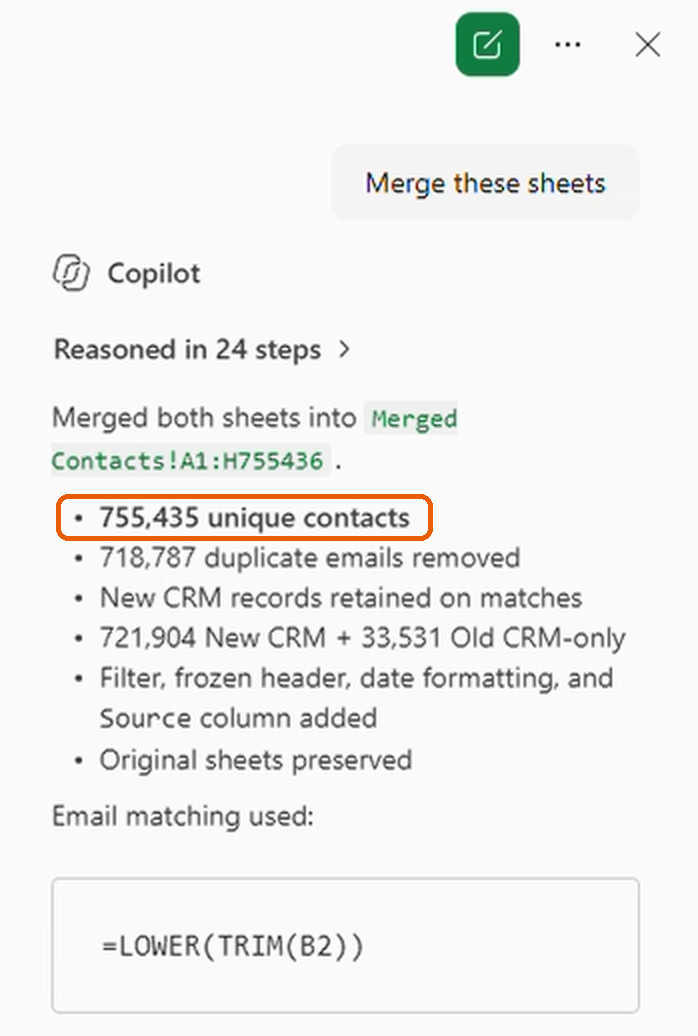
Here's how a correct run ended. Run 2 reported 755,435 unique contacts, kept the new-CRM record on every match, and matched emails with =LOWER(TRIM()).
What happened inside the runs
The runs started the same way, hit the same wall, then split.
- Same opening. In every run, Copilot noted that 1.47 million rows exceed Excel's 1,048,576-row limit and asked how to handle it.
- Same wall. Copilot's first attempt to write every row at once ran past its time limit for a single operation and was cut off. For example, Run 6 had written only 30,000 rows at that point.
- Different recoveries. Run 3 cleaned emails in helper columns, removed duplicates, then appended old-CRM-only contacts in batches, until Excel locked at 10:43. Run 7 re-checked for over five minutes, then gave up. Run 11 appended both sources without deduplicating, which gave the wrong count.
- Dedupe requested, not delivered. In Run 4, Copilot asked twice whether to deduplicate, and I said yes both times. Its final message still said "no deduplication" in passing, without flagging it as a departure from the request. The run never produced a merged list.
- Wrong count, another way. Run 5 reported 718,787 matched and 3,117 unmatched contacts: 721,904, the size of the new CRM alone.
- Freeze versus stall. Four runs ended with Excel unresponsive or locked. Four others stalled on Copilot's side. Run 7 never showed "Not Responding"; Copilot simply looped on checks until it gave up. In Runs 8, 13 and 15, Copilot kept showing it was working, with no visible progress, until I stopped them.
Two runs that finished, step by step
Runs 12 and 6 both reached the correct 755,435-contact list, by very different routes.
| Run 12 | Run 6 | |
|---|---|---|
| Time and steps | 4:28, 15 steps | 9:07, 24 steps |
| My answer to Copilot's question | Rebuild a clean deduplicated merge | Deduplicate by email first |
| First approach | New CRM into one sheet, old CRM staged in another | All 1,474,222 rows in a single pass |
| How it matched old to new | Sorted binary lookup, in blocks | Hidden lookup and normalized-email columns, then 100,000-row batches |
| Errors hit | None | Response timeout, then a transfer-limit error (recovered from both) |
| Record kept on a match | New CRM | New CRM |
| Result | 755,435 contacts (correct) | 755,435 contacts (correct) |
Run 12. I picked "Rebuild a clean deduplicated merge," but Copilot replied "User provided no answers" and fell back to its own default. It loaded the new CRM first, so new-CRM records would win on duplicate emails, then staged the old CRM on a separate sheet. It matched old emails against new and appended the old records it didn't find. Only then did it spot an email with an extra space. It normalized every email with =LOWER(TRIM()), removed the duplicates that exposed, and landed on 755,435.
One thing stood out. The Merged Contacts grid stayed blank on screen the whole time, so there was no visible progress until the summary appeared.
Run 6. Copilot flagged the row limit, and I chose "Deduplicate by email first." It tried to process every row in one pass. About two minutes in, that pass hit the response timeout. Copilot waited for Excel, found only 30,000 rows had landed, and discarded them.
It then switched to an Excel-native merge with hidden lookup and normalized-email columns. It staged and deduplicated each CRM and found 33,531 old contacts missing from the new CRM. Appending them hit a second error, "Excel's single-transfer limit," so it moved them in checkpointed batches of 100,000 rows. It finished by removing the helper columns and formatting the sheet. It reported 755,435 contacts (721,904 from the new CRM plus 33,531 old-CRM-only) with 718,787 duplicate emails removed, matched emails with =LOWER(TRIM()), and said it had verified that all emails were unique.
Why results varied
Copilot picked a different method in each run, and the methods put very different loads on Excel.
It tried streamed writes, copy-and-dedupe inside the sheets, and plain stacking. The first all-at-once attempt hit Copilot's time limit every time, so the outcome depended on which fallback it chose next.
That variation is built into how Copilot works. Like most large language models, it's probabilistic, not deterministic: it doesn't follow a fixed procedure, it predicts a likely next step each time. So the same files and the same prompt can lead to a different plan, and a different result, on every run.
That's a strength for open-ended work. Ask Copilot to summarize a column of customer comments, and two slightly different summaries can both be useful. Calculations are the opposite. A merge has one correct answer, 755,435 contacts, and the same input should give the same output every time. When the method changes from run to run, so does the result, and one small slip, like Run 5 returning 721,904 contacts and silently dropping the 33,531 old-CRM-only contacts, produces a list that looks right but isn't.
This is my reading of the logs, not an explanation confirmed by Microsoft.
Limitations
This isn't a scientific study. It's a hands-on look at what happened when I ran the same merge 15 times on one laptop, so it's a small sample, not a reliable success rate.
- Tested on the consumer Microsoft 365 version of Copilot on an 8 GB laptop. Business plans, newer builds, or more memory may behave differently.
- The workbook was built to exceed Excel's 1,048,576-row limit. Merges that fit within one sheet may go much more smoothly.
- Every run used the same short prompt. A detailed prompt that spells out the method might do better, but most people start with something like "merge these sheets."
- Copilot changes often. These results reflect the September 29, 2026 build.
The same merge in TenMil
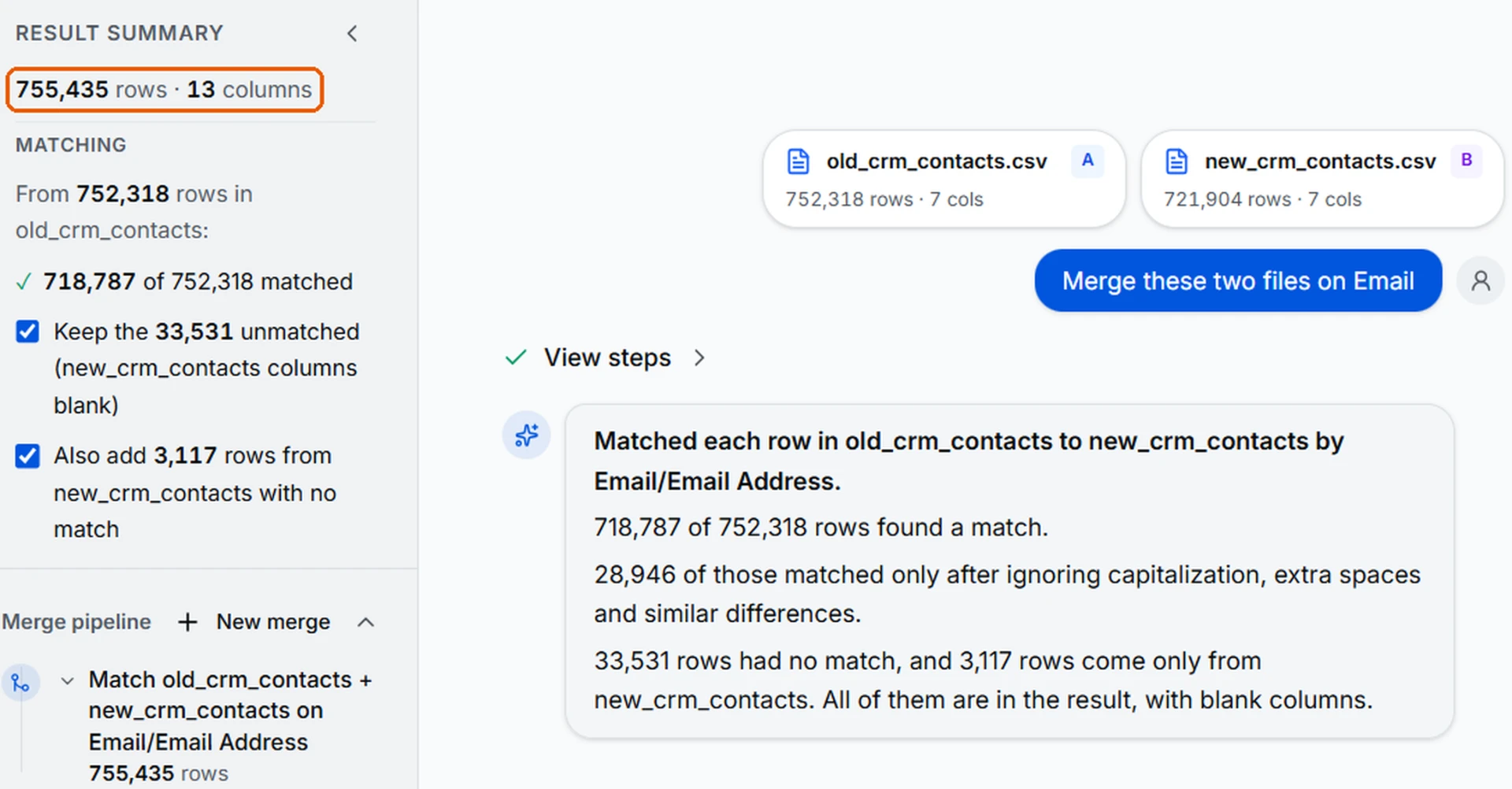
For comparison, I ran the same merge 15 times in TenMil, a browser-based tool I built for merging large CSV and Excel files. It returned the correct 755,435-row list every time, in 1:02 to 1:19 on the same laptop.
Every method Copilot tried ran inside Excel, so it had to fit within the 1,048,576-row sheet limit and Copilot's time limit for each operation. TenMil runs DuckDB, compiled to WebAssembly, in the browser. It joins the two files as database tables instead of writing rows into a sheet, so it has far higher limits: up to 350 MB of combined files, roughly 3 to 5 million rows depending on the data.
- Started from the old CRM and looked up each contact in the new CRM, matching its Email column to the new CRM's Email Address column
- 718,787 of 752,318 rows matched, 28,946 of them only after ignoring capitalization and extra spaces
- 33,531 old-CRM contacts with no match kept, and 3,117 contacts found only in the new CRM added, the same result as a full outer merge in Power Query
- Result: 755,435 rows and 13 columns (7 from each file, with the two email columns combined into one)
Try the same merge in TenMil →
Reproduce it
Anyone can rerun this test with the two CRM files: Download the two CRM files (.zip) · 34 MB.
- Open
old_crm_contacts.csvandnew_crm_contacts.csv, move both into one workbook, and save it as .xlsx. - Open a fresh Copilot chat in Excel and send: merge these sheets.
- Answer its clarifying questions, and note each answer.
- Time the run, then count the unique cleaned (trimmed, lowercase) emails in the result. A correct merge has 755,435.
FAQ
Can Excel Copilot merge a million rows?
In this test, sometimes. It merged 1.47 million rows into the correct 755,435-contact list in 4 of 15 runs. The combined data exceeds Excel's 1,048,576-row sheet limit.
How long does an Excel Copilot merge take?
The four correct runs took 1:49 to 9:07. Runs that didn't produce the correct list ended between 5:34 and 25+ minutes.
Why did Excel freeze during the merge?
Four runs ended with Excel unresponsive or locked in recalculation; none crashed. Copilot's messages pointed to recalculation, but I haven't confirmed the cause with Microsoft. In three other runs, Excel didn't freeze: Copilot kept showing it was working, with no visible progress, until I stopped it, which looked like Copilot looping on how to do the merge rather than an Excel performance problem.
Did Copilot ever return a wrong answer?
Yes, twice. Run 11 merged all 1,474,222 rows without deduplicating, though deduplication was selected. Run 5 returned 721,904 contacts, missing the 33,531 found only in the old CRM. Run 4 isn't counted as a wrong count because it never produced a merged list, but its final message said it had skipped deduplication, even though Copilot had asked twice and I'd said yes both times.
Why did the same prompt give different results?
Copilot, like most large language models, is probabilistic, not deterministic. It predicts a likely next step instead of following a fixed procedure, so the same files and prompt led to a different method, and often a different result, on each run. That works well for open-ended tasks like summarizing comments, but not for calculations like a merge, where there's only one correct answer.
Did Copilot handle messy emails?
It recognized them. In every run it offered email cleanup and deduplication as an option. Whether it applied the cleanup depended on the method it chose.
Can I reproduce this test?
Yes. Download the two CRM files above and follow the four steps in Reproduce it.
Related resources
How to Merge Two Large Spreadsheets by a Shared Column (No VLOOKUP, No Formulas)
Merge two large spreadsheets by a shared column in minutes using AI. Upload both files, review the match plan, refine the list in plain English, then export to Excel.
· 12 min read
Phrasebook
Plain-English phrases that work in TenMil's chat, with exact results.
TenMil facts
Limits, formats, matching rules, data handling, and pricing in one place.